Virtual banking - How to make a deposit
Consilium provides a seamless and fast way to deposit money into your investment accounts on Consilium Wrap using our Virtual Bank Account.
Click the button to download the guide or follow through the instructions below.
What are virtual bank accounts?
When your profile is created on Consilium Wrap, a unique virtual bank account number is generated for each of your investment accounts. These accounts:
- Don’t hold money themselves but are linked to FNZ’s main bank account.
- Ensure that deposits are applied automatically and directly to your investment account.
How to deposit into your virtual bank account
1. Log in to the Consilium Portal: my.consiliumwrap.co.nz/Login
2. Find your virtual bank account details
Navigate to Cash & Payment > Deposits > Banking Details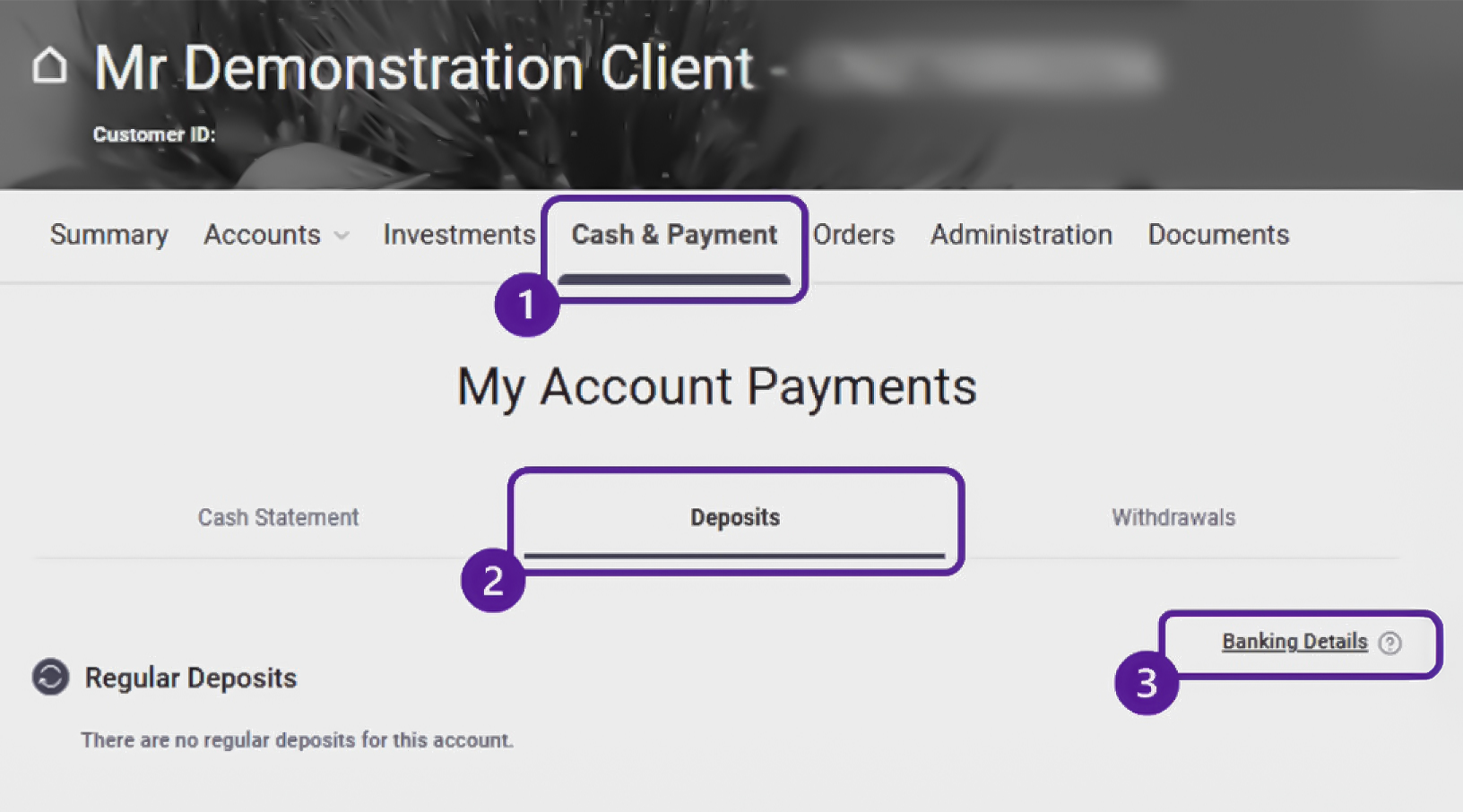
3. Set up a payee in your online banking
- Use the virtual bank account number and beneficiary name for the specific investment account you want to deposit into.
- No reference information is required.
4. Make payments
Once set up, you can make one-off or recurring payments to your virtual bank account anytime.
Important things to know
Confirmation of payee service
From late 2024, banks began rolling out the ‘confirmation of payee’ service to verify account details for online payments.
NOTE: This service does not currently work with virtual bank accounts.
- You may see a message stating that the account details cannot be checked.
- This does not indicate a mismatch, only that the service cannot verify virtual accounts.
Ways to double-check your virtual bank account details:
- You can make a small test deposit between $1-$5 and confirm the amount shows in your investment account the same day.
- Contact your adviser for confirmation.
Deposits in branch
Virtual bank accounts are solely for use online. When doing an over-the-counter deposit in your bank branch you will need to use the main FNZ account and inform your financial adviser:
- Account number: 06-0507-0824711-00
- Account name: FNZ Custodians Ltd Client Funds
- Reference: Client name and CNZ account number (e.g. J Smith CNZ123456)
Other Exclusions
Some deposit types are unable to be done into your virtual bank account. If any of the following apply, contact your adviser to find out the correct way to make your deposit.
- Deposits exceeding your banks daily transfer limit (follow the in-branch instructions above).
- Foreign currency payments.
- NZD payments from offshore accounts.
- Contributions to the KiwiWRAP KiwiSaver Scheme (use the relevant scheme’s bank account).
Deposits to FNZ’s main account may take up to 3 days to process and require correct referencing.
Need help?
If you have any questions or need assistance, feel free to contact your adviser.
Make the most of your virtual bank account and enjoy faster, hassle-free deposits into your investments!